Remove Duplicates from Text
Tool Introduction
The Remove Duplicates tool helps you instantly clean up lists, code outputs, log files, or any line-based text by eliminating repeated entries. Simply paste your content and click the button — duplicates are gone in a flash.
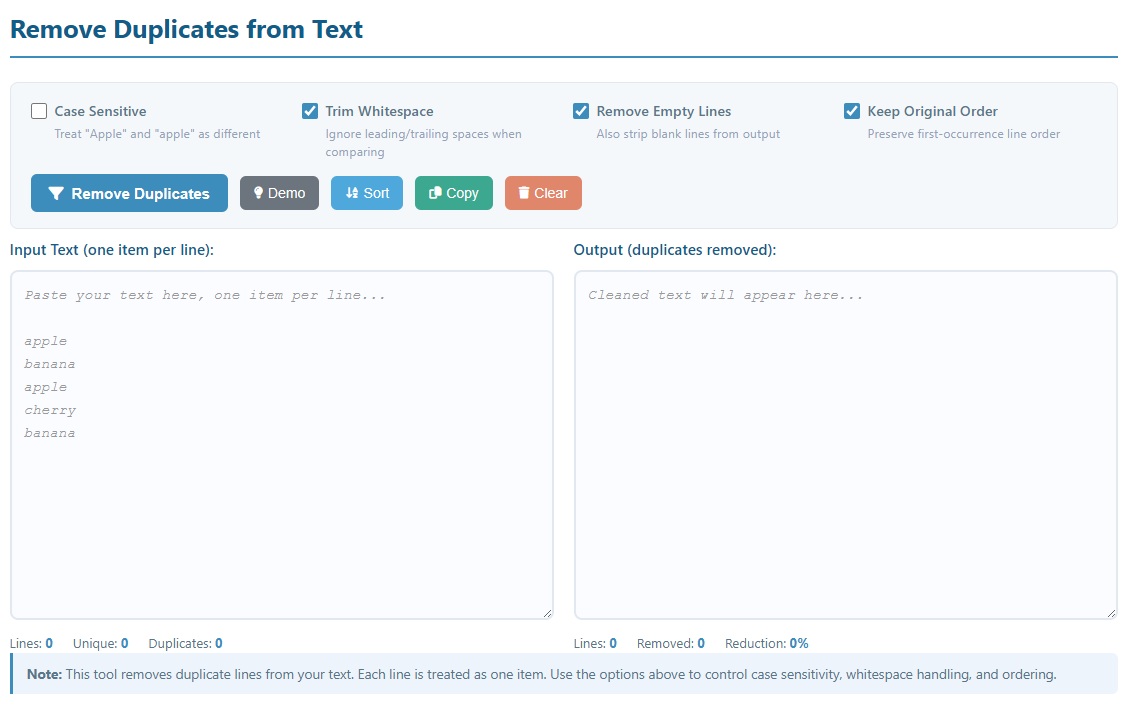
Key Features:
- Remove duplicate lines with a single click
- Optional case-sensitive or case-insensitive comparison
- Trim leading/trailing whitespace before comparing lines
- Strip empty/blank lines from the output
- Preserve the original order of first occurrences
- Sort output alphabetically with the Sort button
- Real-time stats: total lines, unique count, duplicates removed, reduction rate
- One-click copy to clipboard and clear functionality
How to Use
- Paste Text: Copy and paste your text (e.g. a list of emails, keywords, log entries) into the "Input Text" area — one item per line.
- Configure Options:
- Case Sensitive: When checked, "Apple" and "apple" are treated as different items.
- Trim Whitespace: Strips spaces at the start/end of each line before comparing.
- Remove Empty Lines: Clears all blank lines from the output.
- Keep Original Order: Retains the first occurrence order; uncheck to allow reordering.
- Try Demo: Click the "Demo" button to load a sample list and preview the tool.
- Remove Duplicates: Click the "Remove Duplicates" button to process your text.
- Sort (Optional): Click "Sort" to alphabetically sort the deduplicated output.
- Copy Result: Use the "Copy" button to copy the clean output to your clipboard.
Common Use Cases
Deduplicating Email / User Lists
Clean up mailing lists, CRM exports, or user databases by removing duplicate email addresses or usernames. Avoid sending the same message twice and keep your lists accurate.
Cleaning Keyword Lists
Remove repeated keywords from SEO keyword research exports or ad campaign keyword lists. Deduplicated lists improve targeting precision and eliminate wasted ad spend.
Log File Deduplication
Strip repeated log entries from server logs or application output to quickly identify unique events. This makes debugging and auditing far more efficient.
Data Preprocessing
Before importing CSV or plain-text data into a database or spreadsheet, remove duplicate rows to ensure data integrity and prevent constraint violations.
Merging Multiple Lists
Combine several lists from different sources and deduplicate them in one step. Great for consolidating product SKUs, domain lists, or tag collections.
Unique Word / Token Extraction
Extract a unique vocabulary from a tokenized text or code file. Useful for building dictionaries, autocomplete systems, or frequency analysis pipelines.
Cleaning Configuration Files
Remove duplicate entries from .gitignore, hosts files, firewall rule lists, or environment variable files to keep configurations clean and conflict-free.
Content & Copy Editing
Writers and editors can paste bullet-point notes or outline items and quickly spot and remove repetitions before organizing them into final copy or documentation.
Note: This tool processes text line by line. For structured data (e.g. CSV columns), consider exporting the target column as plain text first, deduplicating here, then re-importing the result.