Remove Empty Lines
Tool Introduction
The Remove Empty Lines tool is a simple utility to clean up your text files by removing blank lines. It's perfect for cleaning up code, text documents, logs, or any content that has unwanted empty lines.
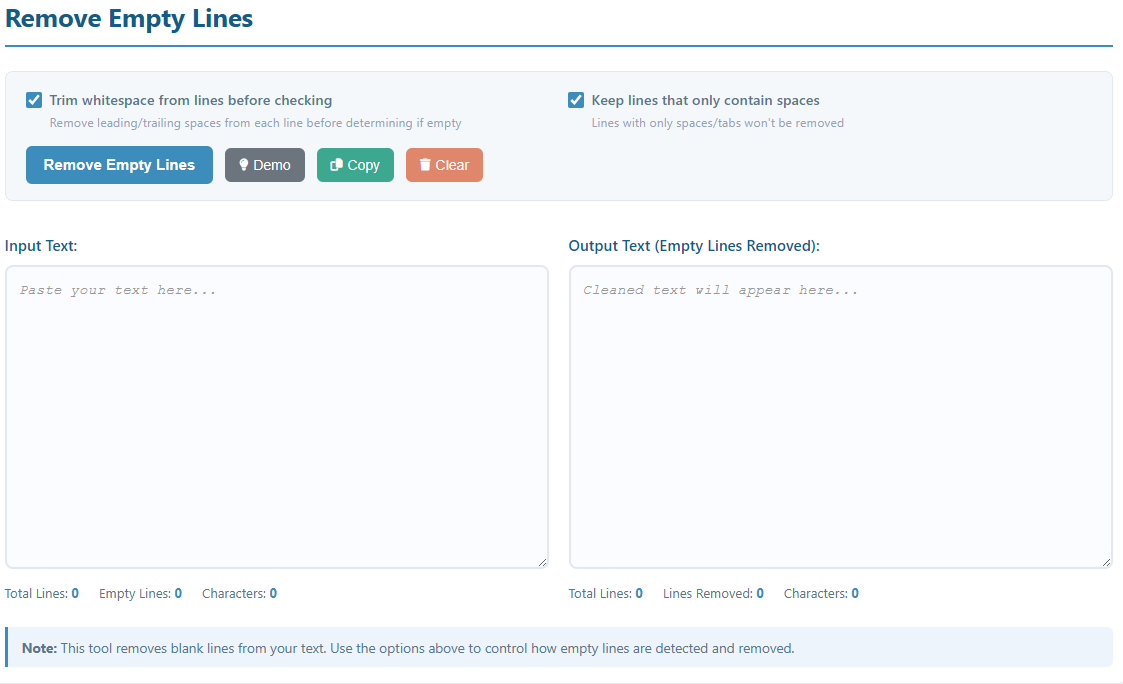
Key Features:
- Remove all completely empty lines from text
- Option to trim whitespace before checking if a line is empty
- Option to keep lines that only contain spaces or tabs
- Real-time statistics showing lines removed and character count
- One-click copy to clipboard functionality
- Demo mode with sample text to test the tool
- Preserves the content and order of non-empty lines
How to Use
- Paste Text: Copy and paste your text into the "Input Text" area.
- Configure Options:
- Trim whitespace from lines before checking: When enabled, spaces and tabs at the beginning and end of each line are removed before checking if the line is empty. This means a line with only spaces will be considered empty.
- Keep lines that only contain spaces: When enabled, lines that have only spaces or tabs will not be removed. This option is useful when you want to preserve indentation or formatting.
- Try Demo: Click the "Demo" button to load sample text with empty lines.
- Process Text: Click the "Remove Empty Lines" button to clean your text.
- Copy Result: Use the "Copy" button to copy the cleaned text to your clipboard.
Understanding the Options
Option Combinations:
- Both unchecked (Default): Only removes lines that are completely empty (no characters at all, not even spaces).
- Trim whitespace only: Removes lines that are empty or contain only whitespace (spaces, tabs). Lines with actual content are preserved and trimmed.
- Keep space-only lines only: Removes completely empty lines but keeps lines with spaces/tabs.
- Both checked: Removes only completely empty lines (no effect as trim is negated by keep spaces).
Common Use Cases:
- Code Cleanup: Use "Trim whitespace" to remove unnecessary blank lines in code files
- Log File Processing: Remove empty lines from log files for easier reading
- Document Formatting: Clean up text documents with excessive line breaks
- Data Processing: Prepare text data by removing empty entries