Remove Symbols from Text
What is the Remove Symbols Tool?
The Remove Symbols from Text utility is a professional online tool designed to help you quickly strip unwanted punctuation, special characters, and non-alphanumeric symbols from your content. Whether you are cleaning up messy data, optimizing text for SEO, or preparing datasets for Natural Language Processing (NLP), this tool provides a fast and precise solution.
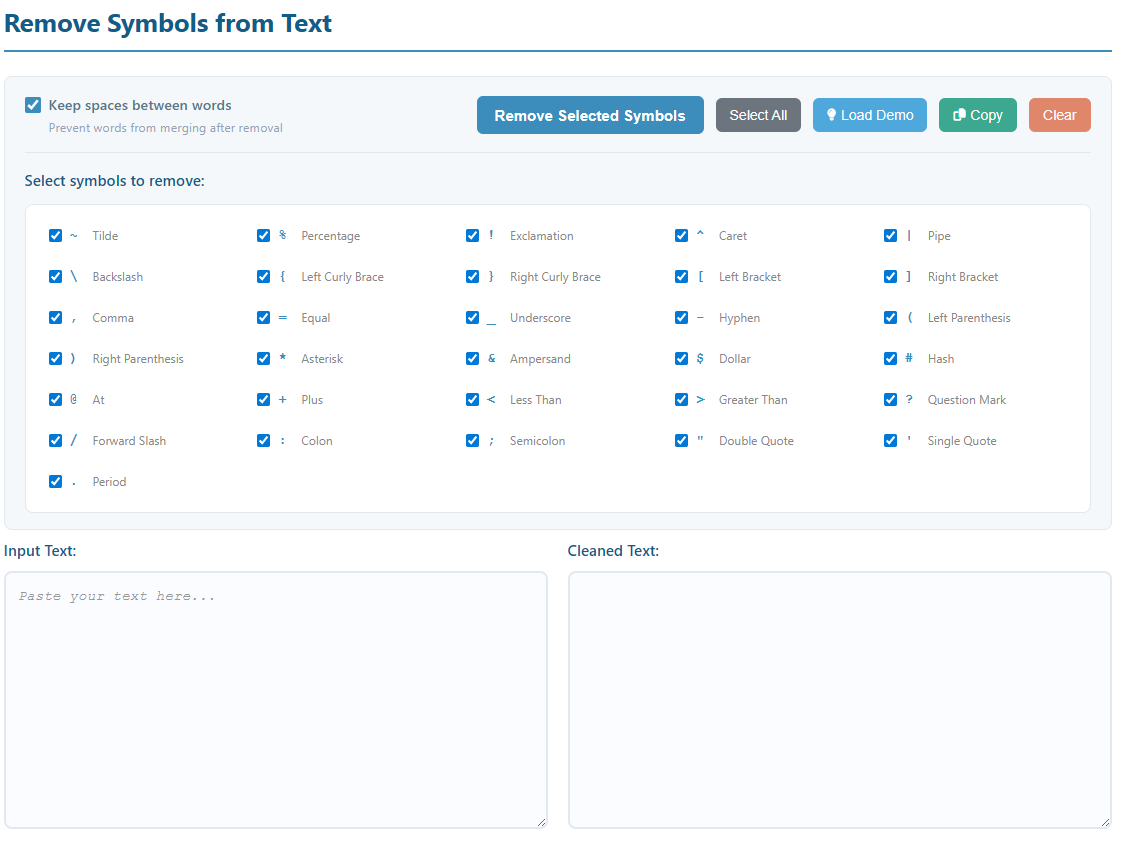
How to Use
- Input Text: Paste your original text containing symbols into the "Input Text" area.
- Select Symbols: Check or uncheck specific characters in the symbol grid (all are selected by default).
- Configure Spaces: Enable "Keep spaces between words" to prevent words from merging together after symbol removal.
- Process: Click the "Remove Selected Symbols" button to generate the clean text instantly.
- Copy Result: Use the "Copy Result" button to save the cleaned text to your clipboard.
Key Features
- Granular Control: Support for 31 specific symbols, including common punctuation (
. , ! ?) and special characters (@ # $ % ^ & *). - Space Protection: An intelligent feature that replaces removed symbols with a single space to maintain readability.
- Real-time Statistics: Automatically tracks character counts for both input and output, plus the total number of symbols removed.
- 100% Client-Side: Your text is processed entirely in your browser. Nothing is uploaded to our servers, ensuring your data remains private.
Common Use Cases
Prepare text for AI training or data analysis by removing noise and extracting pure keywords.
Clean up titles or meta descriptions by removing distracting symbols for better search engine indexing.
Quickly convert logs, code snippets, or scraped web content into clean, readable plain text.
Standardize identifiers or configuration values by batch-removing hyphens, brackets, or underscores.